Every legal request, answered within 24 hours. Privileged from the first word.
Elsie sits between a legal practice and the companies it serves. Each request becomes a matter with named counsel, a visible SLA clock and progress both sides can watch.
T+1 hr acknowledged · T+24 hr answer or plan · built for Infinity Constellation first
- Holding-company GCs
- Fractional GCs
- Boutique practices
- Portfolio companies
- Founder-led teams
More requests every year. Nobody can see where they stand.
81%
of legal departments report rising matter volume. 56% say they are under-resourced.
Thomson Reuters Institute, 2025 Legal Department Operations Index (128 US legal departments). Your numbers will differ.
83%
of legal departments expect demand for their work to increase.
CLOC, 2025 State of the Industry Report (186 organizations)
63%
of chief legal officers expect their headcount to stay the same.
ACC and FTI Consulting, 2026 Chief Legal Officers Survey (1,049 CLOs)
In email, a request is visible to whoever received it. Here, 3 of 24 example requests have a known owner and status.
Example, not client data. 80% of business staff have zero or limited visibility into where a legal request stands. Source: Streamline AI, a legal intake vendor, 2026 Benchmark Report (467 business professionals).
Real screens. Example matters.
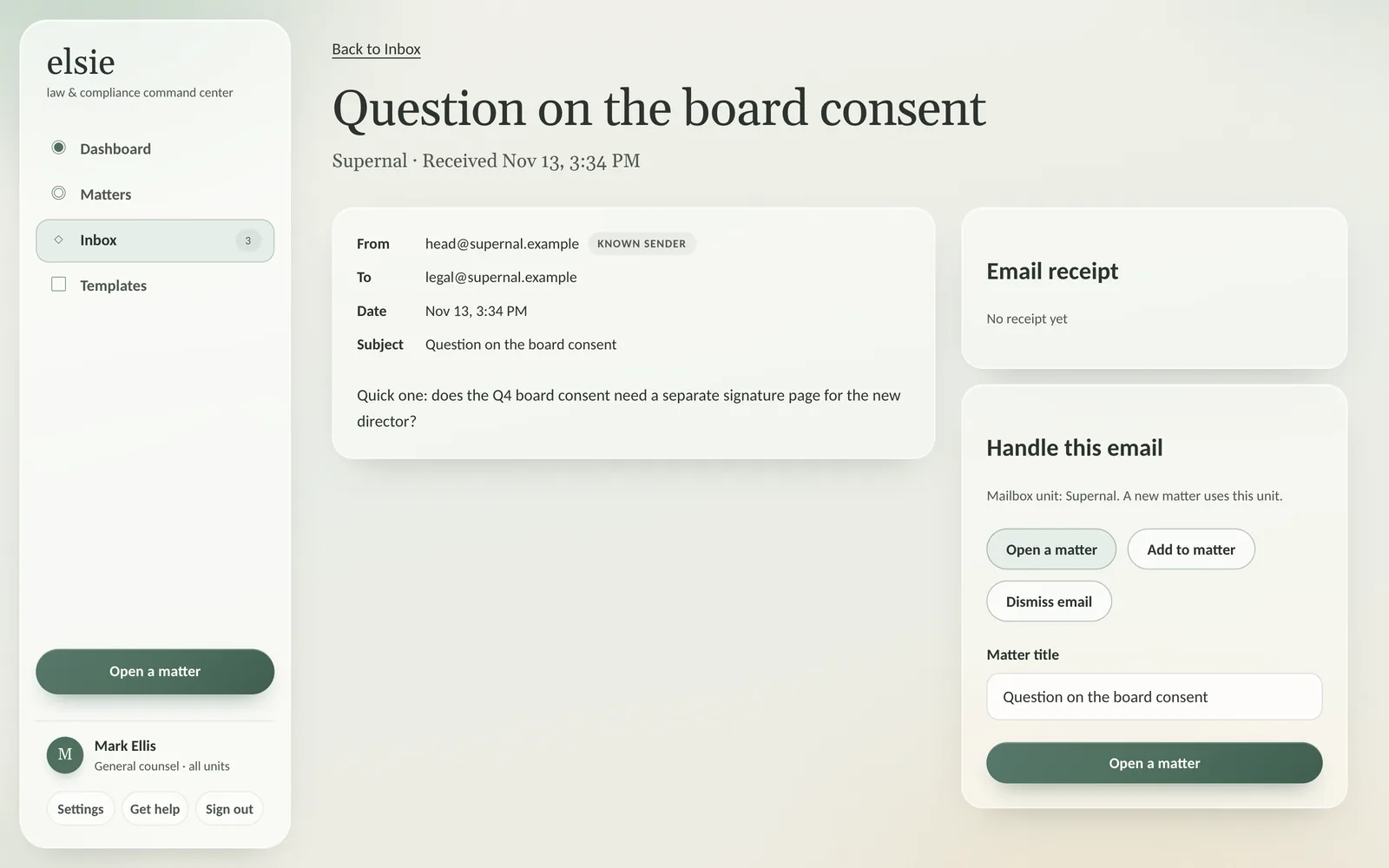
Every email to legal@, triaged in one place.
- The clock starts when the email arrives.
- Open a matter, add it to one, or dismiss it with a reason.
- The sender gets a receipt with the time left.
Everyone gets a short welcome and a tour for their role, a getting-started list that ticks itself, and Help with a glossary of the words Elsie uses.
Two sides. One matter, start to finish.
Ask
Email your legal@ address, or order from the legal menu.
Receipt
An email back with the time to an answer.
Follow
Stage, counsel and progress on the matter.
Answer
A closing note with the answer or the plan.
- A receipt for every request
- One place to see where it stands
- A monthly statement
Most tools cover part of it. Elsie covers the whole request.
Email, a ticketing tool or matter software
- Requests arrive in one placePartly
- An SLA clock both sides can seeOften missing
- A fixed-price legal menuOften missing
- Counsel and the requester on one recordOften missing
- A monthly statement per clientOften missing
- Each unit sees only its own mattersOften missing
Elsie
- Requests arrive in one placeYes
- An SLA clock both sides can seeYes
- A fixed-price legal menuYes
- Counsel and the requester on one recordYes
- A monthly statement per clientYes
- Each unit sees only its own mattersYes
General comparison of common approaches, not specific products.
Built for privileged work.
How Elsie protects matters today, in plain terms.
Scoped by role
A unit sees only its own matters, even from a guessed link. Counsel see tokens, never dollars.
Sign-in protection
Ten wrong passwords pause sign-in for 15 minutes. A session ends after 12 hours without activity or when the browser closes.
A record nobody edits
Sign-ins, matter events and comment authors are kept as they happened. Admin shows them read-only.
Prices kept as charged
Each charge stores its price when it's made. A later rate change never rewrites a closed month.
Careful with email
Elsie checks DMARC and DKIM before it treats a sender as known. Notices carry no matter details and no tracking.
AI in your own cloud
The assistant runs only in the practice's own AWS account. Its usage log keeps no prompts or replies, and members can delete their conversations.
Every change is checked too: a strict content security policy, dependency audits on each change and weekly update checks.
Which of these sounds like you?
Good fit
- A GC or practice serving several business units
- Recurring requests: contracts, NDAs, employment, governance
- A team that wants an SLA it can be held to
Probably not a fit
- Litigation case management
- Document review and e-discovery
- A single one-off legal question
Usually led byGeneral counselFractional GCLegal operationsFounder or CEOHead of finance
Who sees what: the three roles
Access is checked on the server for every request. A unit member who guesses another unit’s link still sees only their own unit.
| What | Unit member | Counsel | GC |
|---|---|---|---|
| Request legal work or open a matter | Own unit | Yes | Yes |
| Comment on a matter | Own unit | Yes | Yes |
| See incoming email | Own unit | Yes | Yes |
| Connect the legal inbox | Own unit | No | Yes |
| Move a matter forward, set progress, log time | No | Yes | Yes |
| Assign counsel | No | Yes | Yes |
| See dollars and statements | Own unit | No | Yes |
| Set prices, billing terms and caps | No | No | Yes |
| See every client and unit | No | Yes | Yes |
| Add counsel and unit members | No | No | Yes |
| Ask the assistant about matters | Own unit | No | No |
What people ask first.
What is Elsie, exactly?
A shared workspace for legal requests between a legal practice and the companies it serves. Every request becomes a matter with named counsel, an SLA clock and progress both sides can see. Time is counted in legal tokens and adds up to a monthly statement.
How does a request reach Elsie?
Two ways. Email the legal@ address on your company's own domain, or order an item from the legal menu. An email goes to the Inbox, where the practice opens a matter. A menu order opens a matter straight away.
Do we need a new email address?
No. Connect the unit's existing Google legal@ address in Settings. Elsie reads only mail sent to that address, and labels what it saves.
Who can see what?
There are three roles. A unit member sees only their own unit. Counsel see every client's matters and work them, in tokens, without dollars. The GC sees everything and sets prices and billing terms.
How do people get access?
The GC adds counsel and unit members in Settings. Each person gets an emailed link to set their own password, then a short welcome and tour for their role. The link works once and expires after three days.
What is a legal token?
One token is one hour of counsel work. Menu items have a fixed token price. Other work runs on tokens, with an estimate and a cap set up front.
Is a statement an invoice?
No. A statement shows the month's legal fees for a client, line by line. Billing and payment follow your engagement letter.
Does Elsie use AI?
Yes, for unit members. They can ask an assistant where their own unit's matters stand, and it can draft a new request for them to confirm before anything is sent. It runs only in the practice's own AWS account, never another provider, and each member's conversations stay private to them. Counsel stay responsible for every answer.
Can a law practice use Elsie with its own clients?
Yes. Each practice has its own clients, business units, counsel, legal menu and statements, kept apart from every other practice. A person who works with more than one unit sees each of them from one account. Elsie runs with Infinity Constellation first.
Your next legal request deserves a receipt.
A first call is 20 minutes. We look at the kind of requests you get and show Elsie working on them.
- No preparation needed
- Nothing confidential needed on the first call
- The walkthrough PDF covers every screen if you want to read first
Request a 20 minute demo
Please don’t include matter details or privileged information in this form.